

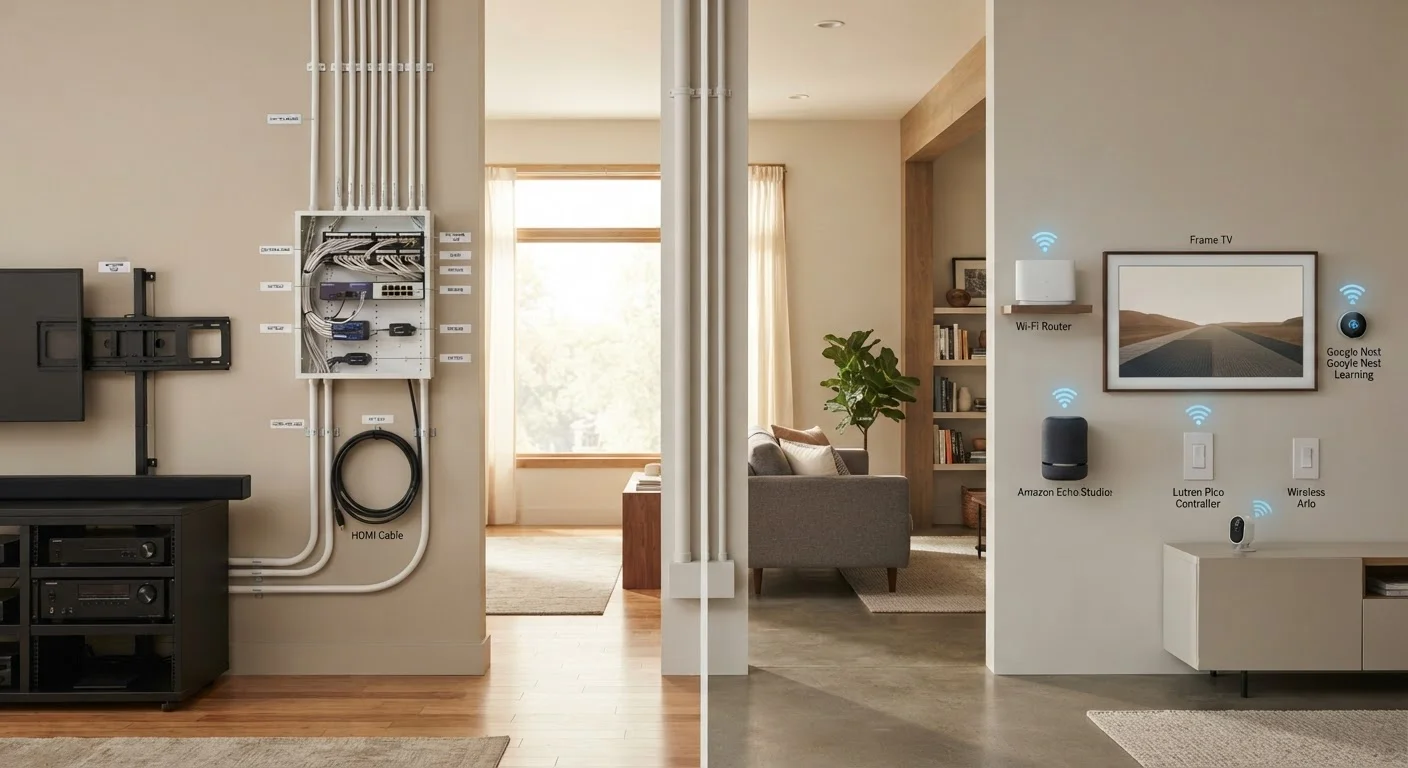
Key Takeaways
Option A
Wired Smart Home Devices
The infrastructure-first, high-reliability approach.
Best for: Homeowners planning long-term installations who prioritize consistent performance and can invest in professional setup.
Option B
Wireless Smart Home Devices
The flexible, accessible entry point for most households.
Best for: Renters, first-time smart home adopters, and anyone who values easy setup and the ability to reconfigure devices over time.
If you own your home and want maximum reliability
Wired Smart Home Devices
Hardwired systems are not subject to Wi-Fi congestion or radio interference, making them a more dependable choice for critical functions like security or lighting control.
If you rent or frequently move
Wireless Smart Home Devices
Wireless devices require little to no permanent installation and can move with you. See our guide on renter-friendly smart home options for specifics.
If you're just starting to explore home automation
Wireless Smart Home Devices
Lower setup complexity and cost make wireless devices the more practical starting point for experimenting with automation before committing to a larger build.
If you're building or doing a major renovation
Wired Smart Home Devices
New construction or gut renovations are the ideal moment to run wiring before walls close, capturing long-term reliability gains with less added labor cost.
If you want to mix and match devices across platforms
Wireless Smart Home Devices
Modern wireless protocols like Matter and Zigbee support broad cross-platform compatibility, giving you more flexibility to combine devices from different manufacturers.
What 'Wired' and 'Wireless' Actually Mean in a Smart Home
In a smart home context, wired devices communicate and receive power through physical cables — typically low-voltage wiring like Cat5e/Cat6 Ethernet, dedicated control bus systems, or in-wall power lines. Examples include hardwired smart lighting panels, in-wall keypads, and security systems using structured cabling.
Wireless devices communicate over radio protocols — Wi-Fi, Zigbee, Z-Wave, Bluetooth, or the newer Matter standard — without needing a dedicated physical data connection beyond standard power. Smart plugs, wireless motion sensors, and battery-powered door locks fall into this category.
The distinction matters because it shapes not just how devices are installed, but how they behave day-to-day. For a broader look at how these communication layers fit together, see our smart home ecosystems explainer.
| Criterion | Wired Devices | Wireless Devices |
|---|---|---|
| Installation complexity | High — often requires professional help | Low — typically DIY-friendly |
| Signal reliability | Very high — no interference | Good to high — depends on network |
| Upfront cost | Higher (labor and materials) | Lower entry point |
| Flexibility / portability | Low — fixed once installed | High — easy to move or replace |
| Suitable for renters | Generally not practical | Well suited |
| Best time to install | New build or major renovation | Any time |
| Dependency on router/hub | Minimal | Moderate to high |
Reliability and Performance: Where Each Approach Holds Up
Wired connections have a structural advantage: once the cable is in place, the signal path is fixed, consistent, and immune to the radio interference that plagues busy wireless environments. In homes with many connected devices, Wi-Fi congestion can cause wireless sensors or switches to respond slowly or miss commands entirely. Wired systems simply don't have this problem.
That said, wireless technology has improved substantially. Mesh Wi-Fi networks and dedicated smart home radio protocols like Zigbee and Z-Wave operate on separate frequency bands from standard Wi-Fi, reducing congestion. For most everyday automations — smart bulbs, thermostats, voice assistants — wireless performance is perfectly adequate. Where wireless struggles most is in environments with thick concrete walls, heavy appliance interference, or very large homes with weak signal at the edges.
~70%
U.S. smart home devices using wireless protocols
Industry analysis consistently places the large majority of consumer smart home devices in the wireless category, driven by Wi-Fi, Zigbee, and Z-Wave adoption.
2.4 GHz & 5 GHz
Wi-Fi bands most commonly congested in dense homes
Homes with many connected devices frequently experience interference on standard Wi-Fi bands, a key reason dedicated smart home radio protocols were developed.
For households already thinking about their network foundation, our guide on building a reliable home network covers the infrastructure side in detail.
Installation, Cost, and Long-Term Flexibility
Installation effort is where the gap between wired and wireless is most stark. Running cables through finished walls typically requires cutting drywall, fishing wire through cavities, and potentially hiring an electrician or low-voltage technician. This is work that generally requires planning, permits in some cases, and budget — costs that vary widely depending on home layout, existing infrastructure, and local labor rates.
Wireless devices, by contrast, can usually be self-installed in minutes. A wireless smart switch replaces an existing wall switch with no new wiring. A wireless sensor sticks to a door frame with adhesive. This accessibility is a major reason wireless dominates the consumer smart home market.
Flexibility cuts both ways, though. Wireless setups are easy to reconfigure as needs change — swap a device, move a sensor, add a hub. Wired systems are harder to change once installed but provide a stable, future-proof backbone that doesn't depend on router performance or spectrum conditions. Interoperability between devices is another ongoing consideration; our article on why smart home devices stop working together explains the ecosystem risks worth knowing about upfront.
Permits and Professional Installation
Some wired smart home work — particularly anything involving your home's main electrical panel or new circuit runs — may require a permit and a licensed electrician under local building codes. Low-voltage wiring (for data, audio, or security sensors) typically has fewer restrictions, but requirements vary by jurisdiction. Always verify local rules before starting any in-wall work, and consult a qualified professional when in doubt.
Thinking Through Your Own Situation
The right choice depends heavily on your living situation, goals, and tolerance for complexity. A renter in an apartment has almost no practical path to wired devices — and doesn't need one for the automations that make everyday life more convenient. A homeowner undertaking a kitchen remodel, however, has a logical opportunity to rough in wiring that would cost far more to add later.
Many professionally designed smart homes actually use a hybrid approach: wired infrastructure for lighting control, security, and audio/video distribution, with wireless devices layered on top for flexible endpoints like sensors, locks, and voice control nodes. This lets the permanent systems carry the load reliably while wireless devices handle the parts of the home that benefit from adaptability.
For a comprehensive view of how all these elements connect — platforms, protocols, privacy considerations, and practical setup — the full picture of smart home automation is worth reading before making significant purchasing decisions.